
Stop watching the chart all night
how Bitunix Super Alerts work, from a plain price alert to a 5-condition AND/OR setup on a trendline
Key takeaway
Most people who lose money on a late-night move were not wrong about the level. They just were not looking when price got there. Bitunix added Super Alerts to its charts for exactly this, and the official announcement lays out what each alert type does. Here is a practical walkthrough.
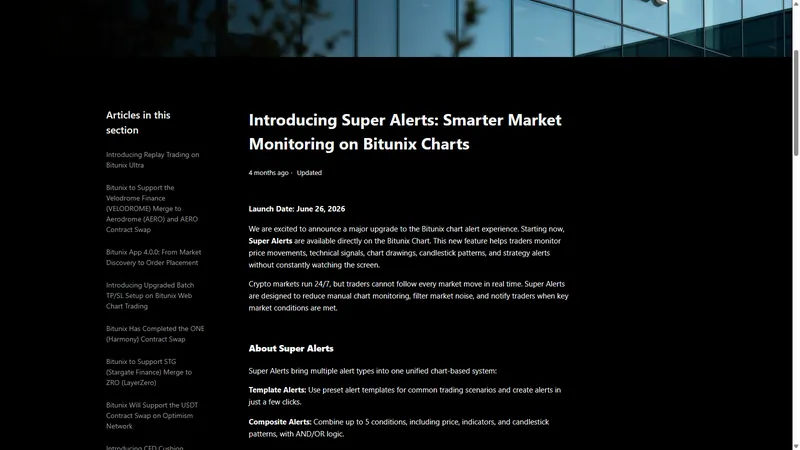
The screenshot above is the public Bitunix support article announcing Super Alerts on Bitunix Charts, with a launch date of June 26, 2026.
The seven alert types on the page
- Template Alerts: preset templates for common setups, created in a few clicks.
- Composite Alerts: combine up to 5 conditions (price, indicators, candlestick patterns) with AND/OR logic.
- Price Alerts: fire when price reaches a level you set.
- Indicator Alerts: watch signals from MACD, RSI, Bollinger Bands, MA/EMA, Volume, EMV and VWAP.
- Drawing Alerts: attach an alert to a trendline, support or resistance line, or channel you drew.
- Candlestick Pattern Alerts: hammer, engulfing, pin bar and top/bottom fractals.
- TradingView Strategy Alerts: pass TradingView strategy signals through to Bitunix notifications.
The announcement also says you can set trigger logic, alert frequency, expiration time and notification channel.
Where to create them
Open any futures or spot chart. Bitunix lists several entry points: the chart alert button, the crosshair menu, drawing tools, indicator panels, and the price alert entry.
Three setups worth building
1. The level you keep refreshing for. Draw a horizontal support line on the ETH chart and add a Drawing Alert on a break. You get pinged when it happens instead of checking every ten minutes.
2. A filtered breakout. A plain price alert fires on every wick. A Composite Alert can require price above your level AND volume rising AND RSI past a threshold you choose. Fewer pings, and the ones you get mean more.
3. A trendline that moves with time. A horizontal price alert cannot follow a rising trendline. A Drawing Alert on the trendline can, because the line itself is the trigger.
Settings that decide whether alerts help or annoy
- Frequency. Once-only for a breakout you plan to act on. Repeating for a level you want to keep monitoring.
- Expiration. Give alerts an end date so old ideas do not keep firing next month.
- Channel. Pick the one you will actually see while asleep or away.
A note on noise
The announcement frames Super Alerts as a way to filter market noise. That only works if you are strict with yourself. Start with two or three alerts on the levels that truly matter for your open positions, review them once a day, and delete the ones that no longer fit the plan.
What an alert is not
An alert does not place an order. It tells you something happened, and you still decide. If you want protection while away, that is a stop-loss on the position, not an alert. The two work best together: the stop protects the position, the alert tells you to come and look.
Bitunix's own risk warning says Super Alerts are informational only.
Common mistakes
- Setting ten price alerts around one level and muting them all by morning.
- Building a Composite Alert so strict it never fires.
- Leaving alerts with no expiration.
- Treating an alert as a stop.
Checklist
- What exact condition am I waiting for?
- Is one price alert enough, or do I need a composite filter?
- Is the level horizontal, or a trendline that needs a Drawing Alert?
- Frequency, expiration and channel set?
- Stop-loss already on the position?
Good alerts mean less screen time and fewer moves you only find out about the next morning.
FAQ
How many conditions can a Bitunix Composite Alert have?
Up to 5, combined with AND/OR logic.
Which indicators are supported?
MACD, RSI, Bollinger Bands, MA/EMA, Volume, EMV and VWAP per the announcement.
Does a Super Alert place a trade?
No. It is informational; use a stop-loss for protection.